Générique
DisplayPort to HDMI adapter • DP male to HDMI female • NEW — Advertised as 4K, to be verified
DisplayPort to HDMI adapter • DP male to HDMI female • NEW — Advertised as 4K, to be verified
Couldn't load pickup availability
🔌 DISPLAYPORT → HDMI ADAPTER — NEW
Standard male DisplayPort • Female HDMI • Passive DP++ announced • Video and audio announced
📅 Posted: August 29, 2026
🔄 Updated: October 30, 2026
💰 $10 CAD • 🛡️ 1-year limited in-store warranty
✅ New product, never used, in original packaging according to the listing.
😊 In simple terms
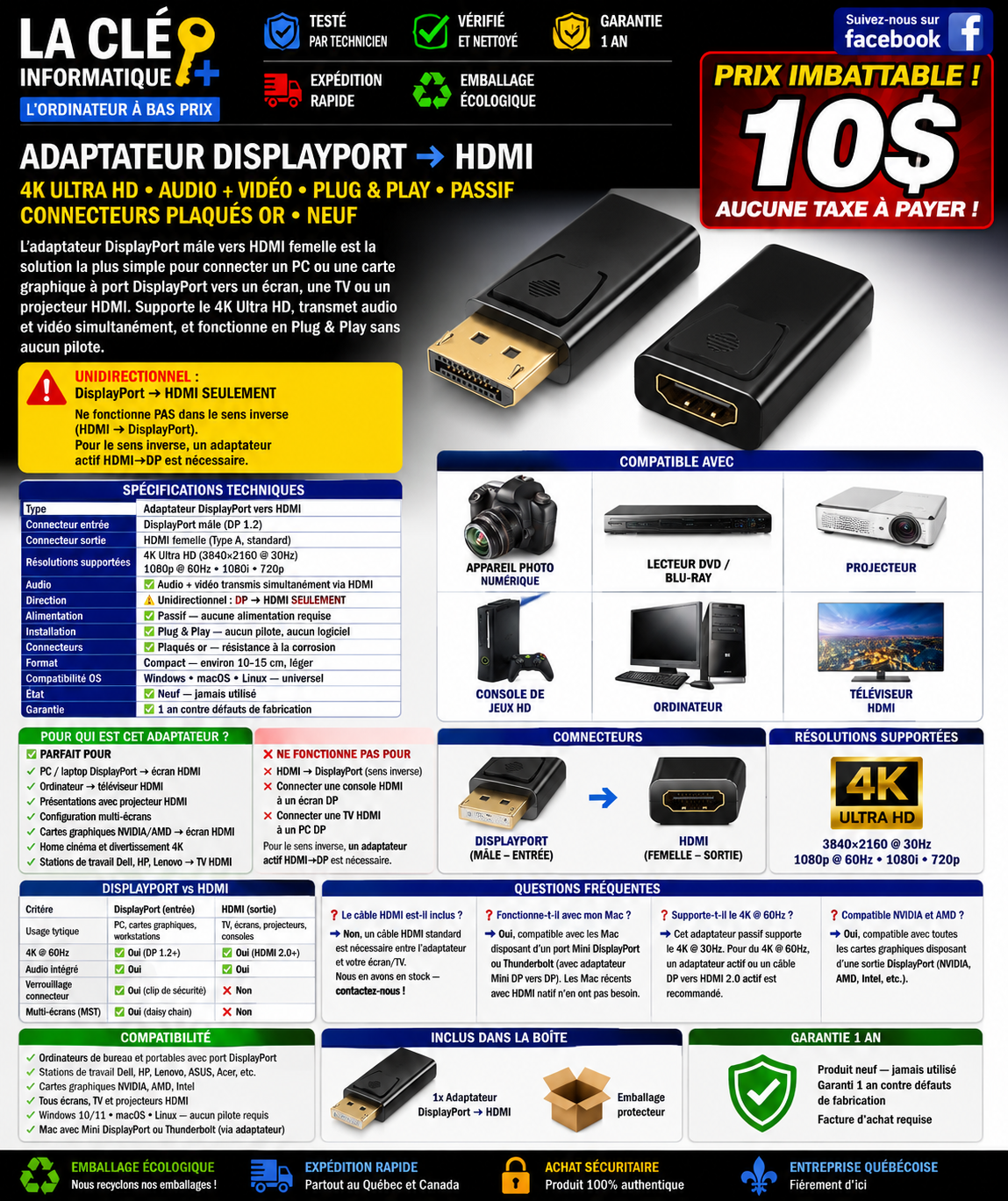
Your computer has a DisplayPort output and your screen has an HDMI input? This new adapter at $10 CAD can make the connection with an HDMI cable sold separately, if the computer output is DP++ compatible.
One direction only: DisplayPort computer → HDMI screen. It does not work for a console or computer HDMI to a DisplayPort screen. Its socket is a full-size DisplayPort, not a Mini DisplayPort or USB-C.
Full HD at 60 Hz, 4K at 30 Hz and digital audio are announced in the listing. 4K and audio are not confirmed test results for this reference; have your setup checked if these functions are essential.
Adapter only, HDMI cable not included. Limited in-store warranty of 1 year from the date of billing.
Want all the details? Read the full listing ↓📖 Full detailed listing
Features, connection, limitations and conditions are presented below.
🔎 To remember before purchase
- One direction only: DisplayPort output from the computer → HDMI input of the screen. Does not work in the HDMI to DisplayPort direction.
- Full-size standard male DisplayPort, Type A female HDMI. No Mini DisplayPort or USB-C.
- Model described as passive: check the DP++ support of your computer output. The only DP 1.2 mention does not confirm this function.
- Full HD 1920 × 1080 at 60 Hz and 4K 3840 × 2160 at 30 Hz announced in the listing. 4K remains to be checked for this reference and your setup.
- Digital audio transmission announced, depending on the source, the adapter, the screen and the settings. No audio test documented here.
- Male-to-male HDMI cable not included, sold separately.
- No proprietary driver or external power supply announced for this passive model.
- NEW, $10 CAD, 1-year limited warranty.
💳 Payment methods
🟢 PayPal
Same-day or next business day shipping after payment confirmation.
🟡 Card on the site
Security verification that can take up to 3 business days before shipping.
Cash, debit card and credit card also accepted in store.
At $10, a small adapter that takes the direction of your screen, without deviating your budget!
📜 Store policy
FINAL SALE
Parts and accessories on final sale; no cash refund according to store policy.
RECOURSE
Covered defect: repair, then new identical or equivalent exchange; store credit if no equivalent available.
ASSISTANCE
Service request or follow-up processed within 48 business hours. This time concerns the intake, not necessarily a completed repair.
INVOICE
Original invoice mandatory to apply the warranty.
📞 514-394-7794 • Tuesday to Sunday, 12 p.m.–5 p.m.
Online returns at customer expense to the Repentigny service center.
⭐ Connect your computer to an HDMI screen
Your computer has a DP++ compatible DisplayPort output, but your screen uses HDMI? This adapter can make the connection with a separate HDMI cable.
On a remote work desk, it allows to connect a screen to an existing output. In the living room or in a meeting room, it can be used to display photos, presentations or multimedia content on a compatible TV or projector.
The rigid single-piece housing is described as compact. Check the space around the port and avoid putting excessive tension on the connector. The adapter does not add a video output and does not change the number of screens supported by the computer.
🔄 Scenarios and direction of operation
| Direction | Source | Display | To know |
|---|---|---|---|
| ✅ DisplayPort → HDMI | PC, laptop or workstation with standard DisplayPort and DP++ compatible. | Monitor, TV or HDMI projector. | Intended direction. Check DP++, resolution, frequency and cable. |
| ❌ HDMI → DisplayPort | PS5/Xbox console, Blu-ray player or HDMI computer. | Screen with DisplayPort input. | Not supported by this offer. You need a converter designed for the reverse direction. |
| ❌ Mini DisplayPort / USB-C / Thunderbolt | Device using one of these ports. | HDMI screen. | No direct connection with this full-size DisplayPort connector. A solution adapted to the exact port is necessary. |
The name Dell, HP, Lenovo or that of the graphics card does not guarantee by itself the compatibility of the output.
📋 Detailed specifications
| Type / brand | Announced video and digital audio adapter / generic. |
| Announced technology | Passive using DP++ (DisplayPort Dual-Mode) on the source. No external power supply announced. |
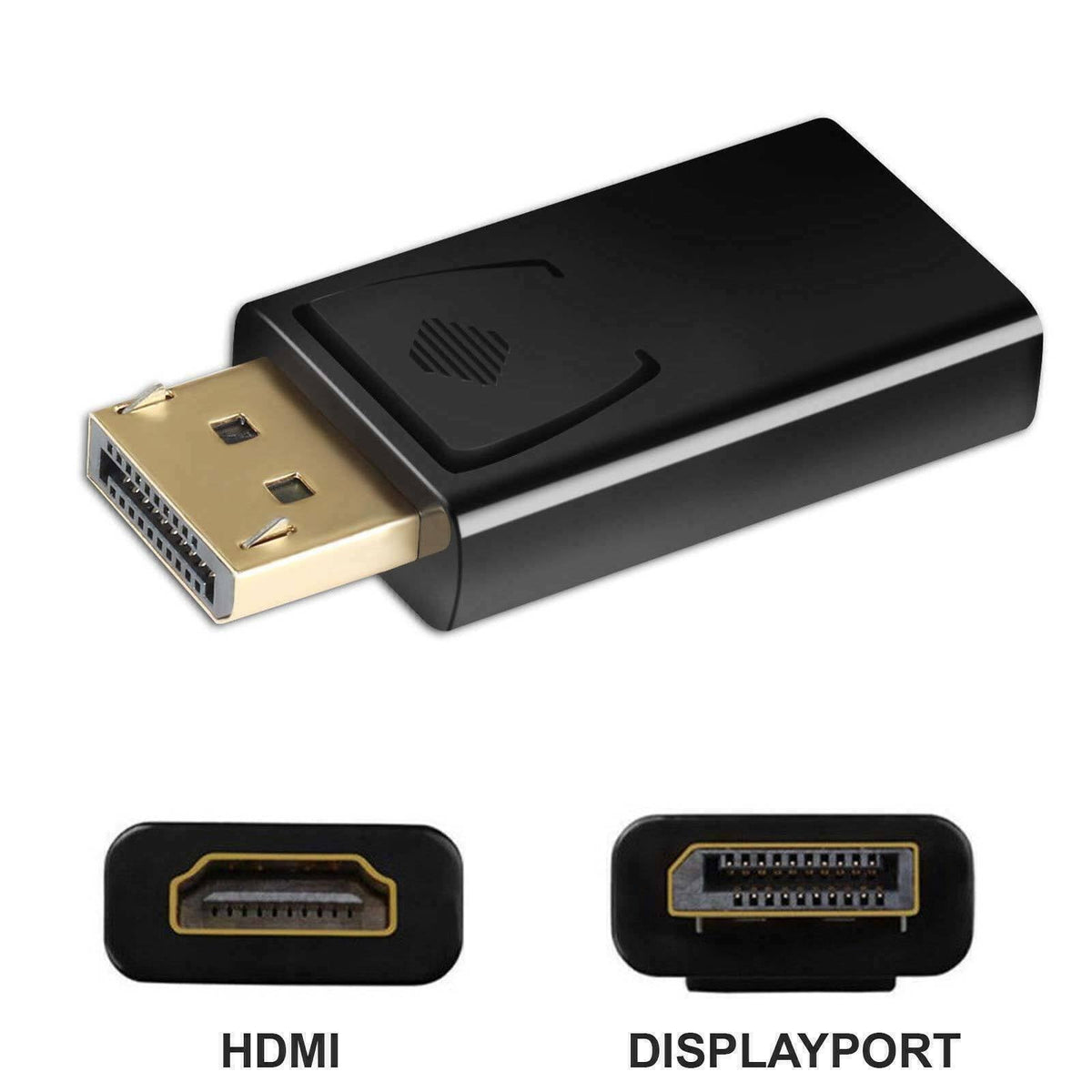
| Input side source | Standard male DisplayPort, full-size. |
| Output side screen | Type A female HDMI. |
| Direction | DisplayPort → HDMI only. |
| Announced resolutions | 4K UHD 3840 × 2160 at 30 Hz; Full HD 1920 × 1080 at 60 Hz; 1080i, 720p and 480p. According to the entire chain; 4K to be checked for this reference. |
| Announced audio | Digital audio stream, multichannel announced in the listing. Formats and number of channels not documented, no universal guarantee. |
| Contacts | Gold-look coating according to the listing; composition, conductivity and corrosion resistance not documented. |
| Format | Compact rigid single-piece housing; exact dimensions not provided. |
| Announced systems | Windows 10/11, macOS and Linux. No proprietary driver for the adapter announced; PC graphics/audio drivers and compatible hardware required. |
| Condition | New, never used, sealed original packaging according to the listing. |
| Price / warranty | 10 $ CAD / 1-year limited in-store warranty from the date of billing. |
Features announced in the provided listing. No independent certificate or 4K/audio test result of this reference is provided.
🔍 DisplayPort, HDMI and DP++ in simple terms
DisplayPort is a common connection on professional PCs and graphics cards. HDMI is common on TVs, projectors and monitors.
DP++ allows a compatible DisplayPort output to provide the signal necessary for a passive HDMI adapter. Check this function on the used output: the DisplayPort version alone does not confirm it. The simple mention of DisplayPort 1.2 therefore does not automatically confirm DP++.
NVIDIA, AMD, Intel or Quadro cards do not all have the same outputs and capabilities. The computer brand, whether it is an OptiPlex, EliteDesk or ThinkCentre, does not replace the verification of the exact model.
Before purchase, check:
- The presence of a full-size DisplayPort output.
- The DP++ support of this output.
- The resolution and frequency supported by the computer.
- The HDMI capabilities of the cable, screen or TV.
4K at 30 Hz means 30 refreshes per second, not 4K at 60 Hz. The announced modes depend on the source, the adapter, the cable and the screen.
🎯 Recommended uses
- Additional HDMI screen on a compatible DisplayPort output, according to the PC multi-screen capability.
- Remote work, documents, spreadsheets and presentations.
- Photos and multimedia content on a compatible TV, with announced audio according to the devices and settings.
- Office parks, businesses, schools or workshops using compatible connectivity.
⚠️ Limitations to know
- No HDMI → DisplayPort operation.
- No 4K at 60 Hz or 120 Hz announced for this offer.
- Does not plug directly into Mini DisplayPort, Thunderbolt or USB-C.
- Does not replace an MST hub and does not guarantee screen daisy-chaining. Compatibility with an MST setup to be checked separately.
- 4K and audio remain announced features, without documented test of this reference here.
- Male-to-male HDMI cable required, not included.
📦 Included in the $10 CAD
🔌 New adapter
A full-size male DisplayPort → female HDMI adapter, original packaging.
Male-to-male HDMI cable not included, sold separately. Ask the store for the lengths, prices and availability.
🔧 Connection
- Check the full-size DisplayPort output and DP++ support of the PC.
- Plug the DisplayPort connector into this output without forcing.
- Connect a compatible male-to-male HDMI cable between the adapter and the HDMI input of the screen.
- Select the correct HDMI input on the screen.
- Choose a resolution and frequency supported by the entire chain.
- For the announced audio, check the playback output chosen on the PC and the screen volume, if it has speakers.
✅ Preparation and shipping
New product, inspected and validated by the logistics team according to the listing. No quantified test bench is provided for 4K or audio.
Fast shipping under reinforced protective packaging, after payment confirmation and according to the payment method. International shipping offered by the store according to the destination and available options for the order.
🛡️ 1-year limited warranty
Duration kept from the listing: 1 year from the billing date of the new product, against manufacturing defects according to the store terms. Coverage of internal operation and original assembly components according to the listing.
🔁 Service
Original invoice mandatory. Free repair of the covered defect; if irreparable, new identical or equivalent exchange; store credit if no equivalent available. No cash refund according to store policy.
Requests or follow-ups processed within 48 business hours. This time concerns the intake, not necessarily a completed repair. For shipped orders, secure return fees to the Repentigny service center at the customer expense.
❌ Exclusions indicated in the listing
- Liquids, beverages or prolonged excessive moisture.
- Fall, impact, shock or improper handling during connection.
- Negligence, abusive use or lack of maintenance.
- Unauthorized structural modification or repair.
- Modified, altered or removed labels or markings.
- Broken, cut or removed packaging security seals, according to the terms of the listing.
- Damage to DisplayPort or HDMI connectors by forced insertion or bad angle.
- Overvoltage, lightning, short circuit or other external factors.
- Windows, programs, viruses or PC driver conflicts causing image or sound anomalies.
- Incompatibility of resolutions or frequencies not supported by the devices.
- Loss of data or work interruption on the connected PC.
- Assistance in setting up the display or audio on Windows or macOS.
- Intervention, adjustment or maintenance by an unauthorized third party.
- Use outside specifications, notably in a dusty or humid industrial environment.
❓ Frequently asked questions
Is the HDMI cable included?
No. A compatible male-to-male HDMI cable is required and sold separately. Ask the store for the lengths, prices and availability.
Does it work on a Mac?
Check the exact port and DP++ compatibility of the used output. This full-size DisplayPort connector does not plug directly into Mini DisplayPort, Thunderbolt or USB-C. Avoid stacking adapters without validation of the entire chain.
Is it compatible with a USB-C computer?
Not directly. A different solution is required, adapted to the exact USB-C port and its video capabilities.
I have the image but not the sound. What to check?
Audio is announced in the listing, but its absence is not necessarily a simple setting. Check that the source and this reference support it, that the screen has speakers, that the drivers work and that the PC uses the HDMI screen as the playback output. Also check the volume. A screen without speakers cannot reproduce the sound itself.
Can I connect a PlayStation or Xbox HDMI to a DisplayPort screen?
No, not with this adapter. It only works from DisplayPort to HDMI. You need a converter designed for HDMI to DisplayPort, suitable for the console and the desired mode.
Is 4K guaranteed?
The listing states 3840 × 2160 at 30 Hz, but no test results for this model are documented. Have this mode and your configuration verified before purchasing if 4K is essential.
♻️ LET'S GIVE OUR COMPUTERS A SECOND LIFE
This accessory is sold NEW, not refurbished. Our overall mission is to promote repair, reuse, and responsible recycling rather than systematic replacement.
A suitable connection can help preserve a still-functional screen and computer when their connections and capabilities are compatible.
CALL BEFORE THE TRASH!
So that future generations do not pay the price of past generations.
🔑 LA CLÉ INFORMATIQUE — LOW-COST COMPUTER
🔌 A small $10 adapter that can save you from changing your screen, if your setup is compatible!
New product • $10 CAD • 1-year limited warranty
📍 423 boul. Lacombe, Repentigny, QC J5Z 1N9
📞 514-394-7794
🌐 lacleinformatique.ca
🕒 Tuesday to Sunday, 12 p.m. to 5 p.m.
Share